
ChromeOS Users -
As part of Google’s ongoing updates to ChromeOS, support for legacy ChromeOS Apps, including the OSTP Chrome App, have been phased out. The new ChromeOS extension-based kiosk application has been designed to replace the current legacy OSTP Chrome App for the 2025-2026 school year.
You must install the new Progress Web App (PWA) and the iTester ChromeOS Carrier Extension before Spring Testing Administration. If you have installed the OSTP Chrome app in previous years, you must remove the legacy Chrome app before adding the OSTP Web App for ChromeOS.
NOTE: Failure to follow each setup step exactly for Chrome OS Users may prevent students from successfully testing in Spring 2026.
As a precaution, we would like to bring to your attention an error message that may be seen when launching the kiosk with the chromeOS PWA incorrectly installed: “This test must be taken with the kiosk or mobile app:”
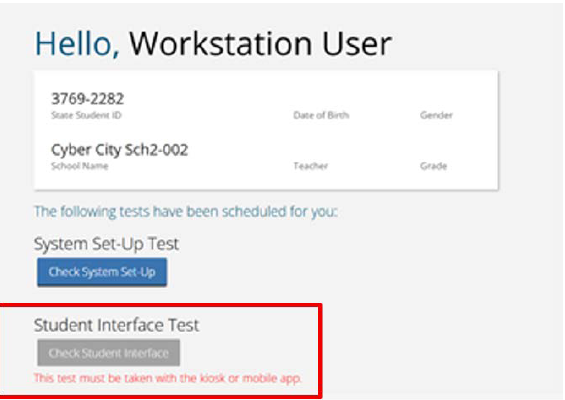
If you see this error message, please review and confirm the following:
- Are you using the chromeOS app from last school year? If so, that application is no longer supported and should be uninstalled. The new chromeOS PWA for this school year must be installed and used by students. (opens in new tab) OSTP Kiosk Installation Guide
- Are you using the new PWA? If so, check the following:
- Is it installed correctly as a kiosk app rather than a user/browser extension?
- Is the iTester Chrome Extension added to the PWA in the Google Admin Console?
- Is the verified mode service account entered correctly?
- Have all steps and notes in the (opens in new tab) OSTP Kiosk Installation Guide been followed exactly?
- Have both parts of the site readiness test been completed? (opens in new tab) Conducting Site Readiness
Any district or school that is continuing to experience issues with the chromeOS PWA and has verified all the above should contact the service center.